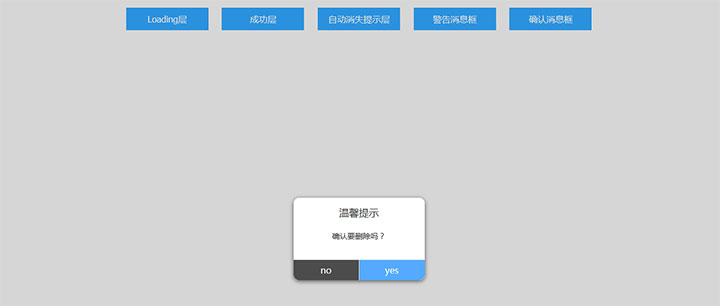




jQuery点击按钮弹出提示层插件,包括加载层和消息确认框5种效果。
js代码
<script type=\"text/javascript\">
	function showLoadingBUtton1(){
		showLoading({
			title: \"数据加载中。。。\", //提示文字
			icon: \'loading\', // 图标,有效值 \"success\", \"loading\", \"none\"
			image: \'\', // 自定义图标的本地路径,image 的优先级高于 icon
			duration: 50000, //提示的延迟时间,单位毫秒,默认:1500
			mask: true, // 是否显示透明蒙层,防止触摸穿透,默认:false
			success: function(res) { //接口调用成功的回调函数
				console.log(JSON.stringify(res))
			},

		});
		setTimeout(function() {
			hideLoading()
		}, 2000)
	}
	function showLoadingBUtton2(){
		showLoading({
			title: \"数据加载成功\", //提示文字
			icon: \'success\', // 图标,有效值 \"success\", \"loading\", \"none\"
			image: \'\', // 自定义图标的本地路径,image 的优先级高于 icon
			duration: 2000, //提示的延迟时间,单位毫秒,默认:1500
			mask: true, // 是否显示透明蒙层,防止触摸穿透,默认:false
			success: function(res) { //接口调用成功的回调函数
				console.log(JSON.stringify(res))
			},

		});

	}
	function showLoadingBUtton3(){
		showLoading({
			title: \"数据加载。。。\", //提示文字
			icon: \'none\', // 图标,有效值 \"success\", \"loading\", \"none\"
			image: \'\', // 自定义图标的本地路径,image 的优先级高于 icon
			duration: 2000, //提示的延迟时间,单位毫秒,默认:1500
			mask: true, // 是否显示透明蒙层,防止触摸穿透,默认:false
			success: function(res) { //接口调用成功的回调函数
				console.log(JSON.stringify(res))
			},

		});
	}

	function showModalButton1(){
		showModal({
			title: \"温馨提示\",  //提示的标题
			content: \"确认要删除吗?\",  //提示的内容
			showCancel: false,  //是否显示取消按钮,默认为 true
			cancelText: \'no\',  //取消按钮的文字,默认为\"取消\",最多 4 个字符
			cancelColor: \"#fff\",  //取消按钮的文字颜色,默认为\"#000000\"
			cancelBgColor: \'#4c4c4c\',  //取消按钮的背景颜色
			confirmText: \'yes\',
			confirmColor: \'#fff\',
			confirmBgColor: \'#55aaff\',
			success: function(res) {
				if (res.confirm) {
					console.log(\'yes\');
				} else {
					console.log(\'no\');
				}
			}
		});
	}
	function showModalButton2(){
		showModal({
			title: \"温馨提示\",  //提示的标题
			content: \"确认要删除吗?\",  //提示的内容
			showCancel: true,  //是否显示取消按钮,默认为 true
			cancelText: \'no\',  //取消按钮的文字,默认为\"取消\",最多 4 个字符
			cancelColor: \"#fff\",  //取消按钮的文字颜色,默认为\"#000000\"
			cancelBgColor: \'#4c4c4c\',  //取消按钮的背景颜色
			confirmText: \'yes\',
			confirmColor: \'#fff\',
			confirmBgColor: \'#55aaff\',
			success: function(res) {
				if (res.confirm) {
					console.log(\'yes\');
				} else {
					console.log(\'no\');
				}
			}
		});
	}
</script>





暂无评论内容